
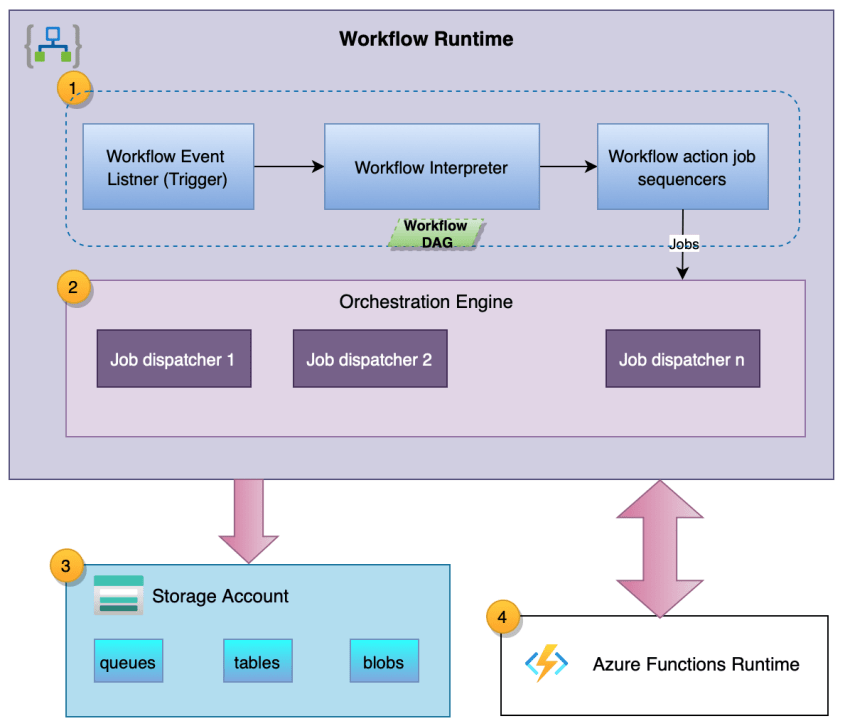
Azure Logic Apps is a cloud-based service offered by Microsoft Azure that allows you to create and run workflows that integrate with various software-as-a-service (SaaS) applications, on-premises systems, and cloud services. If you are preparing for an interview for a role that involves working with Azure Logic Apps, it is essential to familiarize yourself with the commonly asked interview questions in this domain. In this article, we have compiled a comprehensive list of Azure Logic Apps interview questions that will help you prepare for your upcoming interview.
See these Azure Logic Apps Interview Questions
- What are Azure Logic Apps and how do they differ from Azure Functions?
- What are the key components of Azure Logic Apps?
- How can you create a logic app in Azure?
- What is the purpose of connectors in Azure Logic Apps?
- How can you monitor the execution and performance of Azure Logic Apps?
- What is the difference between a trigger and an action in Azure Logic Apps?
- What are the various deployment options available for Azure Logic Apps?
- How can you handle errors and exceptions in Azure Logic Apps?
- What is the role of expressions in Azure Logic Apps?
- How can you secure Azure Logic Apps?
- What are the different types of triggers available in Azure Logic Apps?
- How can you schedule a logic app to run at a specific time?
- What is the purpose of the “For Each” loop in Azure Logic Apps?
- How can you pass data between actions in Azure Logic Apps?
- What is the difference between a synchronous and asynchronous workflow in Azure Logic Apps?
- How can you handle long-running workflows in Azure Logic Apps?
- What is the purpose of the “Until” loop in Azure Logic Apps?
- How can you implement conditional logic in Azure Logic Apps?
- What are the limitations of Azure Logic Apps?
- How can you debug and troubleshoot issues in Azure Logic Apps?
- What is the role of triggers in Azure Logic Apps?
- How can you integrate Azure Logic Apps with Azure Functions?
- What is the purpose of the “Compose” action in Azure Logic Apps?
- How can you pass dynamic content in Azure Logic Apps?
- What are the best practices for designing Azure Logic Apps?
- What is the role of connectors in Azure Logic Apps?
- How can you handle retries and timeouts in Azure Logic Apps?
- What is the purpose of the “Scope” action in Azure Logic Apps?
- How can you implement exception handling in Azure Logic Apps?
- What are the different authentication options available for Azure Logic Apps?
- How can you implement versioning in Azure Logic Apps?
- What is the purpose of the “Terminate” action in Azure Logic Apps?
- How can you trigger a logic app manually?
- What is the role of conditions in Azure Logic Apps?
- How can you implement parallel execution in Azure Logic Apps?
- What is the purpose of the “Switch” action in Azure Logic Apps?
- How can you handle large payloads in Azure Logic Apps?
- What is the role of the “Initialize Variable” action in Azure Logic Apps?
- How can you implement error handling in Azure Logic Apps?
- What is the purpose of the “Delay” action in Azure Logic Apps?
- How can you implement batching in Azure Logic Apps?
- What are the benefits of using Azure Logic Apps over traditional integration methods?
- How can you trigger a logic app based on a specific condition?
- What is the role of the “Response” action in Azure Logic Apps?
- How can you implement pagination in Azure Logic Apps?
This list of Azure Logic Apps interview questions should give you a good starting point for your interview preparation. Make sure to understand the concepts and practice answering these questions to increase your chances of success in your upcoming interview. Good luck!






